Purpose
An area dedicated to managing all of your digital proposals. Here they can be seen all in one place to be edited or deleted if you need to. You have easy access to the Property itself in Core, the URL to the proposal itself, see whether or not the proposal is currently Active, see the expiry date (if set) and be able to tell when it was last modified.
Instructions
- From the Properties > Marketing menu, click View Proposals
- An itemized version of the window can be seen below:
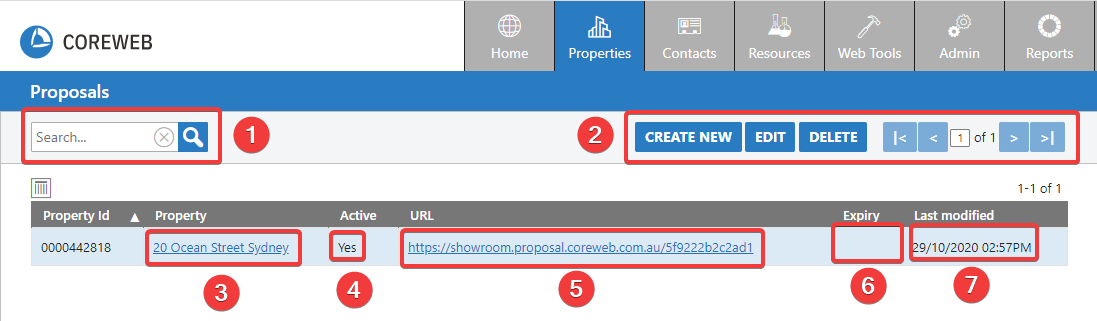
KEY:
- The search window. Helpful if you have many active proposals and need to find one specifically.
- The top menu
- Create New – Click to make a new proposal. When clicking this you will be prompted to pick one from your Property listings in the system.
- Edit – Highlight a proposal, then click edit if you wish to make changes to it. Double clicking the proposal performs the same function.
- Delete – Highlight a proposal and click this to delete it.
- The Property address. This is clickable and will take you straight to the details of the property.
- Indicator as to whether or not the proposal is active on the web.
- The URL of the proposal. This is clickable.
- Indicator to the expiry date of the proposal, if set.
- The date and time that the proposal was last modified.
Most users will be in here simply to open existing proposals, or delete them. The majority of further function is found by opening the proposal itself and editing it.