Purpose
The Core system caters for QR registration on multiple types of activity. One is visitors to your office, two is OFI attendees, and the third is for those attending an Auction. This guide covers Auction attendees
Instructions
Note: This guide assumes you are already familiar with the Properties section of the Core system. More on this can be found here
- After creating your Auction Property in the Core system, open it and navigate to the Activity tab
- Once here, expand the “Registered to Bid” section
- To access the QR features for your Auction, click the Options button at the top right and you’ll see a screen similar to below
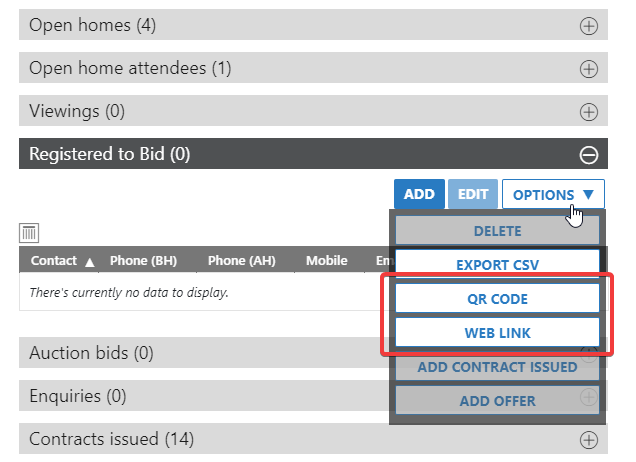
- Click QR Code to download the jpg for the properties Auction. Once downloaded you can print it to display in the entryway of the Property
- The Web Link button takes you straight to the registration page. This just exists for convenience and allows you to look at what the registration page looks like. It is fully functional.
- Once the Auction is over, anyone that has registered using the QR code will be added as a Contact and will appear in the “Registered to Bid” section. You can now communicate with them in relation to this, or future properties.