Purpose
Similar to Tasks, but slightly different a Diary entry is designed for you to keep track of meetings instead of single actionable items. A Diary item allows you to invite other Core users to the event.
Instructions
- Highlight the Contact you wish to add a Diary entry for and click Create Diary Entry. The Diary screen will appear:
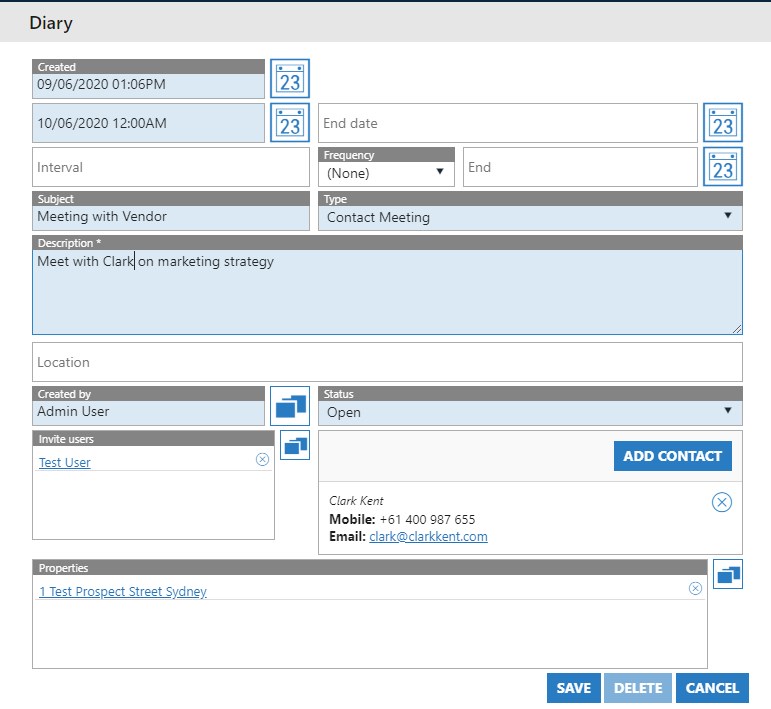
- Ensure you fill in all of the required fields: Start Date, Subject, Description, and Type.
- You can add an Interval with a frequency if you wish but for this example we will leave blank
- Other Users from your agency can be invited if needed
- Add the Property associated with the Diary item if applicable
- The Contact will automatically pre-fill.
- Press Save once done. If set up you can have Diary items appear on your home screen in exactly the same fashion as the Task example above.
- As with all activities, the saved Diary item will also appear in the Activity tab of the Property to be marked as Done when it is complete.