Purpose
Using requirements attached to Contacts and attributes set on a Property, provide a list of people that might be interested in your listing. From here you can SMS or email this list of people and start a dialog on it. It is important to capture buyer’s requirements because without them, they will not match any Properties.
Instructions
- Highlight the Property you wish to work with, then click Match Buyers from the Marketing menu.
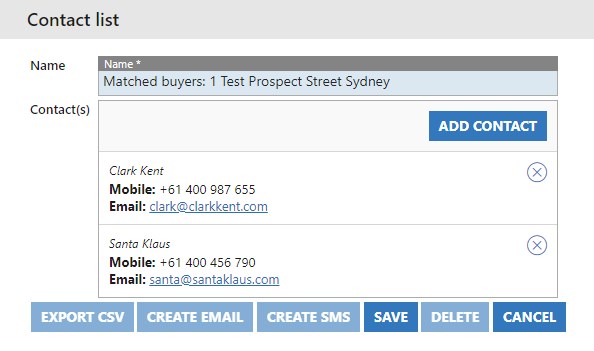
- Based on our buyer’s requirements, and the Property attributes we have matched with two people. If you want to proceed, press Save to keep the Contact List that you’ve just generated.
- The Export CSV, Create Email and Create SMS icons are now lit up and available. In this example we will send an SMS. Click the Create SMS button.
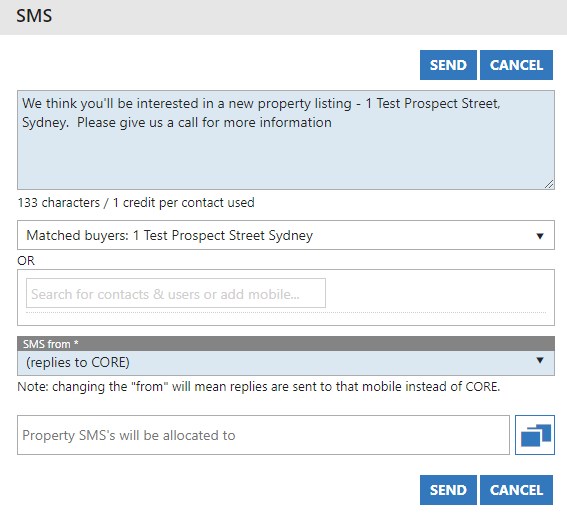
- Next, fill in the body of the SMS. These are limited to 160 characters per SMS.
- The Contact List you’ve just saved will be automatically selected.
- SMS from can be changed to be from a generic agency address, or a specific User. Replies will be sent to the number you’ve chosen here.
- You can allocate the SMS’s to a certain office if you wish.
- Once done, press Send.